
Connect your Anthropic organization to see what you spend on the Claude API next to your cloud costs. Hyperglance reads your organization's usage and cost reports from Anthropic's Admin API, and breaks the spend down by workspace, model, token type (input, output, cache reads and writes), pricing tier, API key and user.
Your Anthropic spend then appears in Cost Explorer, Trends & Anomalies, budgets and the AI Central dashboard, with the AI usage dimensions (AI Model, API Key, Pricing Tier, User / Service Account and Token Type).
Note
This covers the Anthropic API, billed through the Claude Console. Claude Enterprise (claude.ai) organizations aren't supported. For Claude used through Amazon Bedrock, connect the AWS account's cost data instead.
Create an Admin API key
- Sign in to the Claude Console as a member with the organization admin role.
- Go to Settings › Admin keys and click Create key. Name it (for example "Hyperglance") and choose an expiration.
- Copy the key. It starts with
sk-ant-admin01-and is only shown once.
Admin keys have full Admin API access
Anthropic's Admin API keys can't be limited to reading reports: each has full access, including managing members, workspaces and API keys. Hyperglance only calls the read-only usage and cost reports, and lists workspaces, API keys and users to show their names. Create a key just for Hyperglance, so you can revoke it on its own. See Anthropic's documentation.
Connect it in Hyperglance
In Hyperglance, go to Settings › Platforms, click Connect Platform and choose Anthropic.
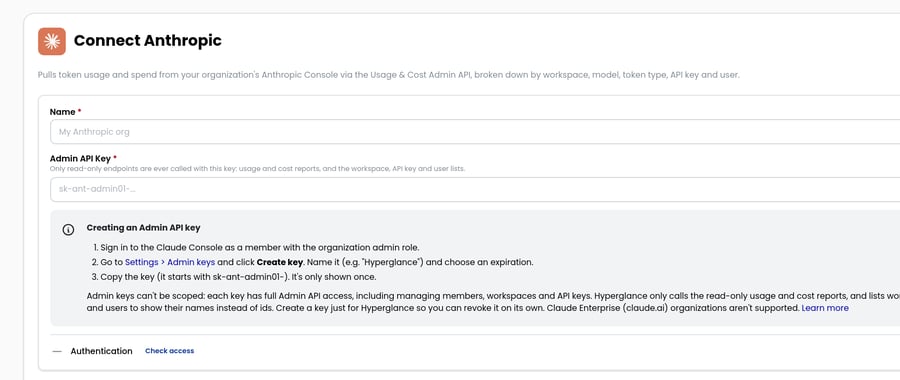
Give the connection a Name (for example your organization's name) and paste the Admin API Key. Click Check access to test the key.
Connect
Click Connect. Hyperglance imports your organization's spend history, newest first, then keeps it up to date with each collection. It appears under Cost Sources on the Platforms page.