
Commitments covers commitment-based discounts: AWS Reserved Instances and Savings Plans, Azure reservations and savings plans, and Google Cloud Committed Use Discounts. It shows how well you use the commitments you have, and where buying more would cut your bill. It has three tabs: Summary, Recommendations and Portfolio.
Summary
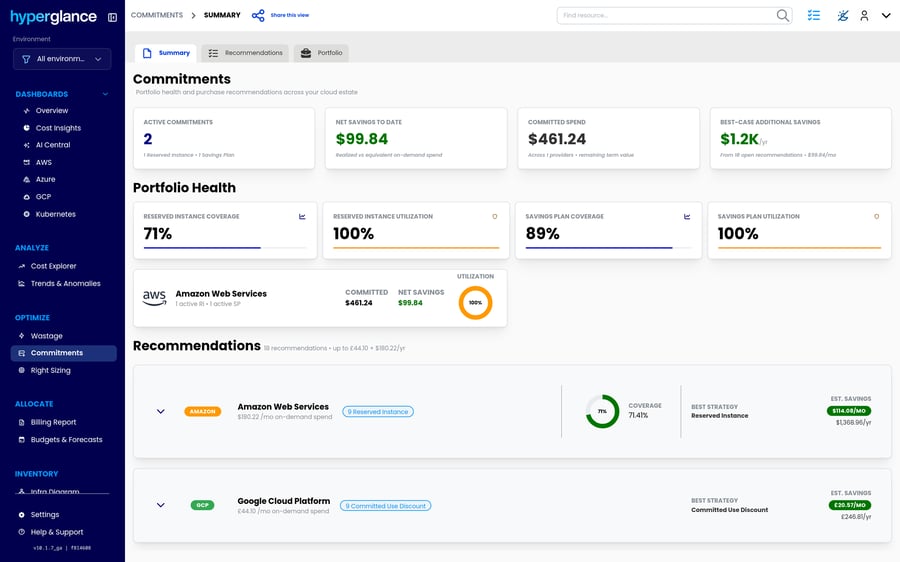
- Active Commitments, Net Savings To Date (compared with paying on-demand prices for the same usage), Committed Spend (the value left on your active commitments' terms) and Best-Case Additional Savings from the open recommendations.
- Portfolio Health: coverage and utilization of your Reserved Instances and Savings Plans (see below), and the same figures for each provider.
- Recommendations: for each provider, the on-demand spend that commitments could cover, the best strategy (for example Reserved Instances) and the estimated savings. Expand a provider for the details.
Recommendations
Hyperglance recommends commitments from your recent usage. Under Showing, pick the kind of recommendation:
| Recommendation | For |
|---|---|
| AWS EC2 Reserved Instances | EC2 instances that would cost less with a reservation. |
| AWS Savings Plans | Compute spend that a Savings Plan would cover. |
| Azure VM Reservations | Virtual machines that would cost less with a reservation. |
| Azure Savings Plans | Compute spend that an Azure savings plan would cover. |
| GCP Committed Use Discounts | Compute Engine usage that a commitment would cover. |
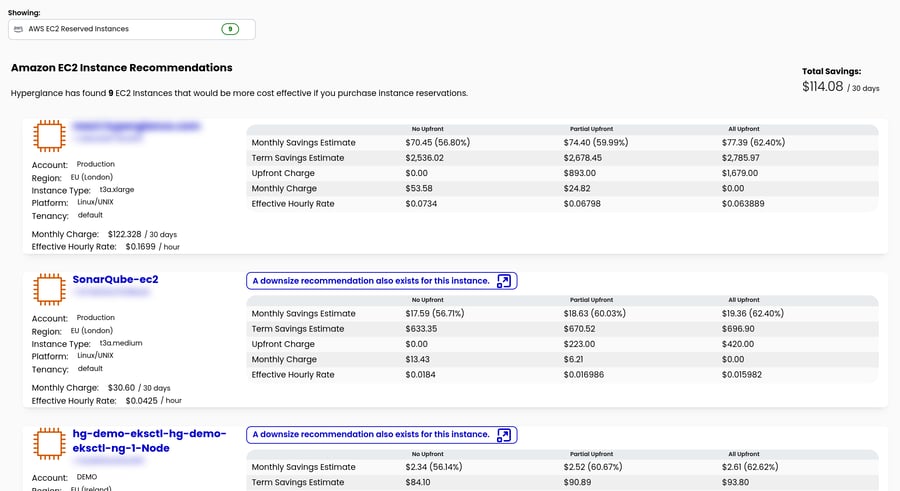
Each recommendation shows what you'd pay and save. For Reserved Instances, compare No Upfront, Partial Upfront and All Upfront: the estimated monthly and term savings, the upfront and monthly charge, and the effective hourly rate. Choose a 12- or 36-month Term Duration, sort the list, and Export it as CSV. When an instance also has a right-sizing recommendation, it's flagged: resize it before you reserve it.
Savings plan recommendations can be scoped to a billing account or a subscription, and compared across terms and payment options. They show the hourly commitment, upfront cost, estimated savings, when it breaks even, and the estimated coverage and utilization.

If there's nothing to recommend, the page says so. Recommendations change as your usage does, so check back.
Portfolio
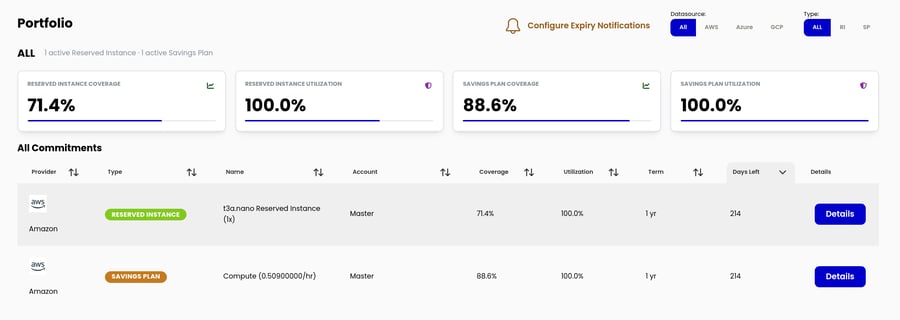
The Portfolio tab lists your active commitments: the provider, type, account, coverage, utilization, term and days left. Filter by provider (Datasource) and Type (Reserved Instances or Savings Plans), and click Details for more about a commitment.
Coverage and utilization
- Coverage: how much of your eligible usage your commitments pay for. Low coverage means you're paying on-demand prices for usage a commitment could cover.
- Utilization: how much of what you've committed to you actually use. Low utilization means you're paying for commitment you don't use.
Expiry notifications
Click Configure Expiry Notifications to be told before commitments expire, in time to renew or replace them. Add one or more Threshold Days (for example 30 and 7 days before expiry), choose the channels (email, Slack or Microsoft Teams) and enable it. Channels are set up in Settings › App Integrations (see Configuring notifications).